

MCP Integrations
MCP integrations let your AI workflows connect directly to business tools, data systems, and communication platforms through dedicated MCP servers.This page is your single reference for all available servers from
mcp-service-1/MCP/mcp-server/, written with direct, human-friendly action names.
Integrations inside our platform
Our platform includes a dedicated Data Connectors section where you can discover, connect, and configure MCP tools from one place.You can enable connectors like HubSpot, Slack, Gmail, Google Sheets, Airtable, Google Maps, WordPress, Shopify, Zoho CRM, OCR, and many others - then immediately use them in your agent workflows.
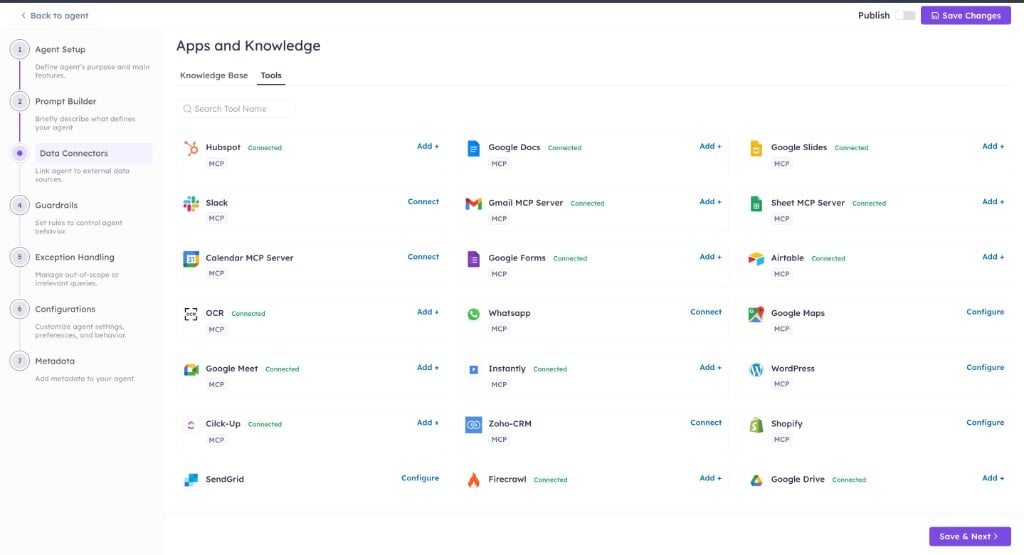
How this works in practice
- Open your agent and go to Data Connectors.
- Browse the available MCP tools and choose the services your workflow needs.
- Click Connect, Add, or Configure based on the provider requirements.
- Complete authentication once (OAuth, API key, or provider token).
- Use the connected tools directly in agent logic for actions like messaging, CRM updates, scheduling, document operations, and data sync.
Why this setup is useful
- Single place to manage integrations: no need to configure each service in separate systems.
- Large tool variety: supports communication, CRM, productivity, ecommerce, mapping, and AI utility connectors.
- Faster automation delivery: connect tools once, then reuse them across multiple agents and flows.
- Operational clarity: connector status is visible (
Connected,Connect,Configure) so teams know what is ready to use.
How to use this reference
For every integration below, use this pattern:- Pick the server that matches your workflow goal.
- Use the direct action name (for example, Send Email, Add Row, Create Event).
- Pass the required IDs/fields and run the action.
- Use the returned data in the next workflow step.
- If an operation is not available, call the provider API directly with the same credentials.
Integrations Directory
Google Sheets
Direct tool names: Create Sheet, Read Rows, Add Row, Update Row, Read Cell, Update Cell, Clear Rows, Check Updates.Authentication: Google access token via bearer/auth headers or session auth.
Airtable
Direct tool names: List Bases, List Tables, Read Records, Create Record, Update Record, Delete Record, Search Records, Check Updates.Authentication: Airtable token in headers or session auth.
Gmail
Direct tool names: Read Emails, Search Emails, Send Email, Create Draft, Read Labels, Trigger on New Email.Authentication: Google access token in headers or session auth.
Google Calendar
Direct tool names: List Calendars, Check Availability, Create Event, Update Event, Delete Event, List Events.Authentication: Google calendar token via headers or session auth.
Google Docs
Direct tool names: List Drives, List Folders, List Documents, Create Document, Read Content, Replace Text, Append Text.Authentication: Google docs token in headers or session auth.
Google Drive
Direct tool names: List Files, Search Files, Create File, Update File, Move File, Share File, Download File, Create Folder.Authentication: Google drive token in headers or session auth.
Google Form
Direct tool names: Create Form, Read Form, Update Form, List Responses, Check Updates.Authentication: Google forms token in headers or session auth.
Google Maps
Direct tool names: Search Places, Place Details, Geocode Address, Reverse Geocode, Get Directions, Distance Matrix.Authentication: Google Maps API key via headers/payload/session/env.
Google Slides
Direct tool names: Create Presentation, Read Presentation, Add Slide, Update Slide Content, Replace Text.Authentication: Google slides token in headers or session auth.
Brevo
Direct tool names: Create Contact, Update Contact, Search Contact, Manage Lists, Campaign Actions.Authentication: Brevo API key in headers or session auth.
Calcom
Direct tool names: Check Availability, Create Booking, Update Booking, Cancel Booking.Authentication: Cal.com token in headers or session auth.
ClickUp
Direct tool names: List Tasks, Create Task, Update Task, Search Task, Delete Task.Authentication: ClickUp token in headers or session auth.
Firebase
Direct tool names: Read Data, Create Data, Update Data, Delete Data, Query Data.Authentication: Firebase token in headers or session auth.
HubSpot
Direct tool names: Create Contact, Update Contact, List Contacts, Create Company, Create Deal, Check Updates.Authentication: HubSpot token in headers or session auth.
SendGrid
Direct tool names: Send Email, Create List, Add Contact, List Campaigns, List Contacts.Authentication: SendGrid API key + sender context, via headers/session.
Shopify
Direct tool names: Search Products, Read Product Details, Add to Cart, Subscribe Customer.Authentication: Shopify tokens + shop domain from headers/session.
Slack
Direct tool names: Send Message, Read Channels, Read Messages, Update Message, Trigger Checks.Authentication: Slack token in headers or session auth.
Transcription
Direct tool names: Transcribe Audio, Language Detection, Model-Based Transcription.Authentication: Provider keys from environment (Deepgram/Azure).
WhatsApp Business
Direct tool names: Send Message, Send Template, List Templates, Upload Media, Download Media.Authentication: Access token plus account IDs (
phone-number-id, waba-id for some actions).
WordPress
Direct tool names: Create Post, Update Post, List Content, Publish Content, Search Content.Authentication: WordPress REST auth through request/session context.
PDF.co
Direct tool names: Convert To Text, Convert To CSV, Create From URL, Merge, Split, Add Password, Parse Document.Authentication: PDF.co API key via
x-api-key header; session fallback (pdfco).
Webflow
Direct tool names: List Sites, List Collections, Create Collection Item, Publish Collection Item, List Form Submissions, Publish Site.Authentication: Webflow site API token as bearer; session fallback (
webflow).
WooCommerce
Direct tool names: List Products, Get Product, Create Product, List Orders, Update Order Status, Search Customers.Authentication: Consumer Key + Consumer Secret with store URL, from headers/session.
Zoho CRM
Direct tool names: List Records, Create Record, Update Record, Search Records, Delete Record.Authentication: Zoho access token in header/body with session fallback.
Zoho Desk
Direct tool names: List Tickets, Read Ticket, Update Ticket, Add Comment, Search Tickets.Authentication: Zoho Desk token plus optional org headers, session fallback.
Zoho Mail
Direct tool names: Read Emails, Search Emails, Send Email, Manage Mailbox.Authentication: Zoho Mail token in headers or session auth.
OCR
Direct tool names: Extract Text, Parse Document, Validate Output.Authentication: OpenAI key and optional vision model configuration.
Quick implementation tips
- Use these direct action names in UI/workflow docs.
- Keep one credential source per server to avoid token mismatch.
- Validate required IDs before write actions.
- For change monitoring, store last processed timestamp/record ID.
Google Sheets
Google Sheets
What it does: Spreadsheet automation with rows, sheets, and cell-level updates.Main operations: create spreadsheet, list sheets, append/update rows, read/update cells, clear ranges, detect sheet updates.Authentication:
access-token / sheets_access_token / Authorization: Bearer, with session fallback (google_sheets).Links: MCP doc · Google Sheets APIAirtable
Airtable
What it does: Airtable base/table/record management and change tracking.Main operations: list bases/tables/columns, CRUD records, search records, monitor new/updated/deleted records.Authentication:
access-token / airtable_access_token / Authorization: Bearer, with session fallback (airtable).Links: MCP doc · Airtable APIWhatsApp Business
WhatsApp Business
What it does: WhatsApp Business messaging, templates, and media workflows.Main operations: send message, template operations, media upload/download/delete, response-driven communication flows.Authentication: token via
access-token / meta_wa_access_token / Authorization: Bearer, with required IDs (phone-number-id, waba-id depending on operation).References: MCP doc · Meta Cloud APIFallback approach: If a specific operation is missing, call the endpoint directly with HTTP using the same credentials.Gmail
Gmail
Google Calendar
Google Calendar
Main operations: list calendars, check availability, create/update/delete events, fetch event windows.Authentication:
access-token / calendar_access_token / Authorization: Bearer, with session fallback (google_calendar).Links: MCP doc · Google Calendar APIGoogle Docs
Google Docs
Main operations: list drives/folders/docs, create docs, append/replace/get content, document triggers.Authentication:
access-token / google_docs_access_token / Authorization: Bearer, with session fallback (google_docs).Links: MCP doc · Google Docs APIGoogle Drive
Google Drive
Main operations: file/folder CRUD, share, move, search, download/upload, snapshots/triggers.Authentication:
access-token / google_drive_access_token / Authorization: Bearer, with session fallback (google_drive).Links: MCP doc · Google Drive APIGoogle Form
Google Form
Main operations: create forms, manage questions/options, list responses and update form structure.Authentication:
access-token / google_forms_access_token / Authorization: Bearer (+ session auth where configured).Links: MCP doc · Google Forms APIGoogle Maps
Google Maps
Main operations: places search/details, geocode/reverse geocode, directions, distance matrix, roads/elevation/timezone.Authentication: API key via
api-key/api_key/payload or bearer-like header; session fallback (google_maps).Links: MCP doc · Google Maps PlatformGoogle Slides
Google Slides
Main operations: create/update slides, manipulate presentation elements and slide content.Authentication:
access-token / slides_access_token / Authorization: Bearer, with session fallback (google_slides).Links: MCP doc · Google Slides APIBrevo
Brevo
Calcom
Calcom
Main operations: scheduling actions and booking workflow integrations.Authentication:
Authorization: Bearer, access-token, or token, with session fallback (calcom).Links: MCP doc · Cal.com APIClickup
Clickup
Main operations: task/list workflow operations and project updates.Authentication:
access-token / clickup_api_token / Authorization: Bearer, with session fallback (clickup).Links: MCP doc · ClickUp APIFirebase
Firebase
Main operations: app data operations and backend workflow actions.Authentication:
Authorization: Bearer, access-token, or token, with session fallback (firebase).Links: MCP doc · Firebase docsHubspot
Hubspot
Main operations: contact/company/deal operations and CRM event workflows.Authentication:
Authorization: Bearer, hubspot_access_token, access-token, with session fallback (hubspot).Links: MCP doc · HubSpot API overviewSendgrid
Sendgrid
Main operations: send email, contacts/lists, campaigns and sender-based outbound workflows.Authentication: API key via header/payload (
sendgrid_api_key, api_key, bearer) + sender context for send flows; session fallback (sendgrid).Links: MCP doc · SendGrid APIShopify
Shopify
Main operations: product retrieval, cart operations, customer/newsletter actions.Authentication:
access-token / x-shopify-access-token with shop domain and storefront/admin token context; session fallback (shopify).Links: MCP doc · Shopify Admin GraphQL APISlack
Slack
Main operations: channel/user/message actions plus Slack event-style utility flows.Authentication:
access-token / slack_access_token / Authorization: Bearer, with session fallback (Slack auth resolver).Links: MCP doc · Slack Web APITranscription
Transcription
Main operations: speech-to-text conversion and transcript processing.Authentication: environment credentials for providers (
DEEPGRAM_API_KEY, AZURE_STT_API_KEY, AZURE_STT_ENDPOINT).Links: MCP docWordpress
Wordpress
Main operations: content/publishing workflows and CMS operations.Authentication: session auth context (
wordpress) for REST operations; AI helper tools may also use OpenAI key.Links: MCP doc · WordPress REST APIPDF.co
PDF.co
Main operations: PDF conversion (text/CSV/JSON/HTML/image), PDF generation from HTML/URL/Office/image, merge, split, page edits, form filling, passwords, barcodes, document parsing. Actions only — no triggers.Authentication:
x-api-key header (bearer also accepted); session fallback (pdfco).Links: MCP doc · PDF.co APIWebflow
Webflow
Main operations: sites and pages, CMS collections and items, form submissions, assets, ecommerce reads, webhooks, site publishing; triggers on new CMS item and new form submission.Authentication: site API token as
Authorization: Bearer; session fallback (webflow).Links: MCP doc · Webflow Data API v2WooCommerce
WooCommerce
Main operations: product catalog and category browsing, order lookup and status updates, customer records, payment gateways; triggers on new order/product/customer/coupon.Authentication:
consumer_key + consumer_secret with store URL (header/body); session fallback (woocommerce).Links: MCP doc · WooCommerce REST APIZoho CRM
Zoho CRM
Main operations: CRM modules, records, and pipeline-related automation.Authentication:
access-token (header/body), with session fallback (zoho); requests use Zoho-oauthtoken.Links: MCP doc · Zoho CRM APIZoho Desk
Zoho Desk
Main operations: support ticket and desk workflows.Authentication:
access-token plus org context headers (org-id variants) where required; session fallback (zohodesk/zoho-desk).Links: MCP doc · Zoho Desk APIZoho Mail
Zoho Mail
Main operations: mailbox and message automation in Zoho Mail.Authentication:
access-token or bearer auth, with session fallback (zoho_mail).Links: MCP doc · Zoho Mail APIOCR
OCR
Main operations: extract text from images/documents with vision models.Authentication:
OPENAI_API_KEY (and optional OPENAI_VISION_MODEL).Links: MCP doc