

HubSpot
In one line: Connect HubSpot so UnleashX can create and update contacts, companies and deals, log activity, manage tickets and tasks, and pull CRM records on demand.
1. Overview
HubSpot is a CRM platform where teams store contacts, companies, deals, tickets and the activity history that ties them together. It is the system of record for who your customers are and where each opportunity stands. Once HubSpot is connected to UnleashX, your agent can do the busywork for you: create a new contact after a call, log a note or meeting, move a deal forward, raise a support ticket, or look up a customer’s details the moment they’re mentioned. No more switching tabs to update the CRM. Connecting HubSpot to UnleashX keeps your CRM current without manual data entry. Conversations and automations become the source of truth, and your pipeline reflects reality in real time.2. What you’ll need
- A HubSpot account (any paid tier; most tools also work on the free CRM).
- Permission to create a Private App — this requires HubSpot Super Admin access.
- The scopes listed in Section 3 enabled on that Private App.
No admin access? Ask a HubSpot Super Admin to create the Private App and share the access token with you. You only need the token to connect — you don’t need admin rights inside UnleashX.
3. Get your credentials
UnleashX authenticates to HubSpot with a Private App access token (a long-lived Bearer token).1
Open Private Apps
Go to HubSpot → Settings (gear icon) → Integrations → Private Apps:
https://app.hubspot.com/private-apps2
Create a new app
Click Create a private app. Give it a name like “UnleashX” and an optional description.
3
Select scopes
Open the Scopes tab and enable the scopes from the table below.
4
Create and copy the token
Click Create app, confirm, then click Show token and Copy.
Exact scope names can vary slightly by HubSpot account type. If a tool returns a 403, open your Private App and add the scope HubSpot names in the error, then save.
4. Connect on UnleashX
1
Open your agent
Sign in at https://www.tryunleashx.com and open the agent you want to connect.
2
Find HubSpot
Go to Data Connectors and find HubSpot.
3
Connect
Click Connect / Add / Configure and paste your Private App access token.
4
Confirm
Authenticate once. The status will switch to a Connected badge.
Use HubSpot in a Workflow
Once connected, you can add HubSpot to any automation from the Workflows builder. Its triggers and tools appear in the Apps panel, marked with an MCP badge.1
Add a trigger node
Open Workflows → New Workflow. On the canvas, click + Add Trigger. In the Paths panel, open the Apps tab and select HubSpot — its Triggers are listed underneath. Use the search box if you have many connectors.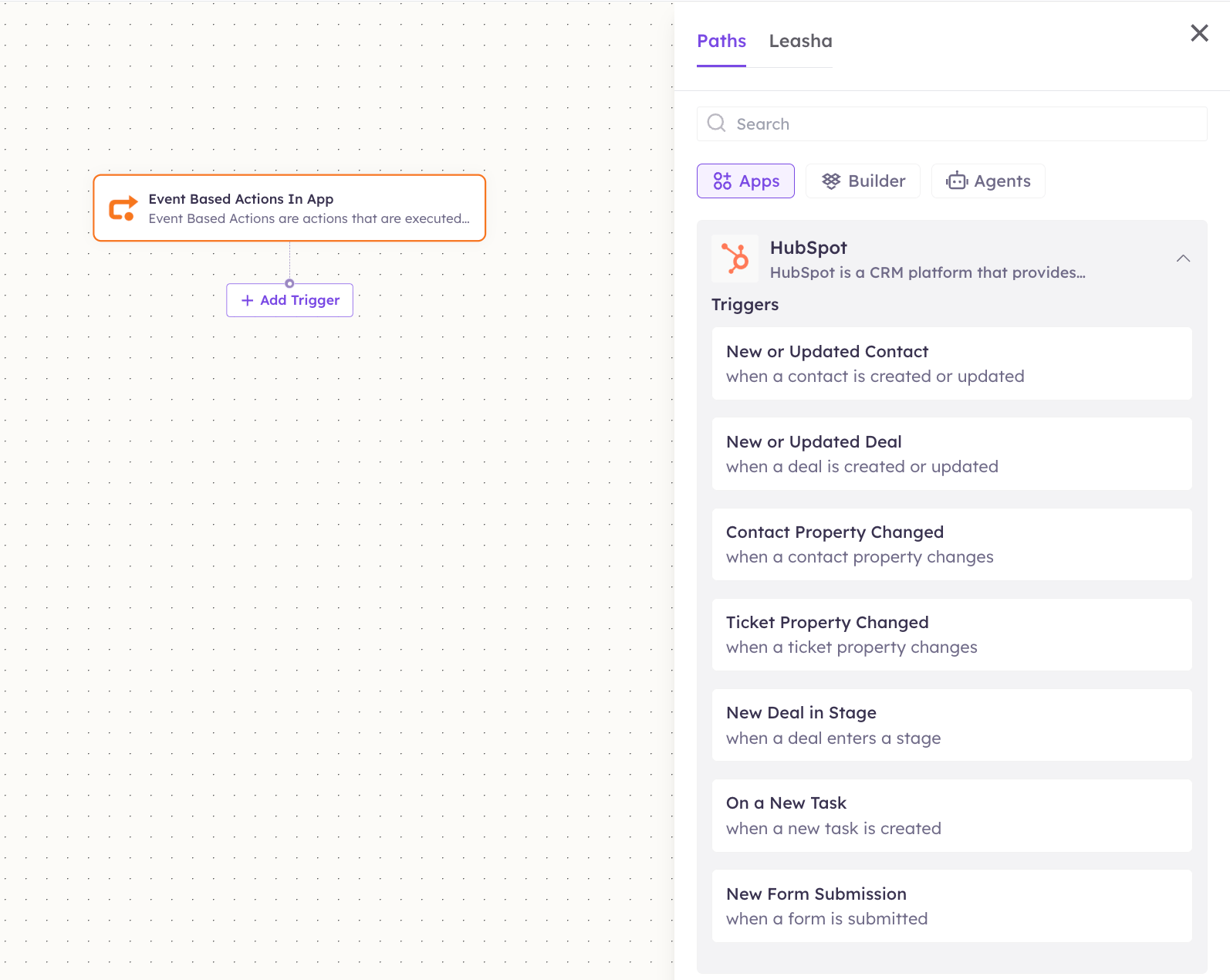
2
Add an action node
Click the + below any node to add a step, then pick HubSpot again — this time the panel lists its Actions.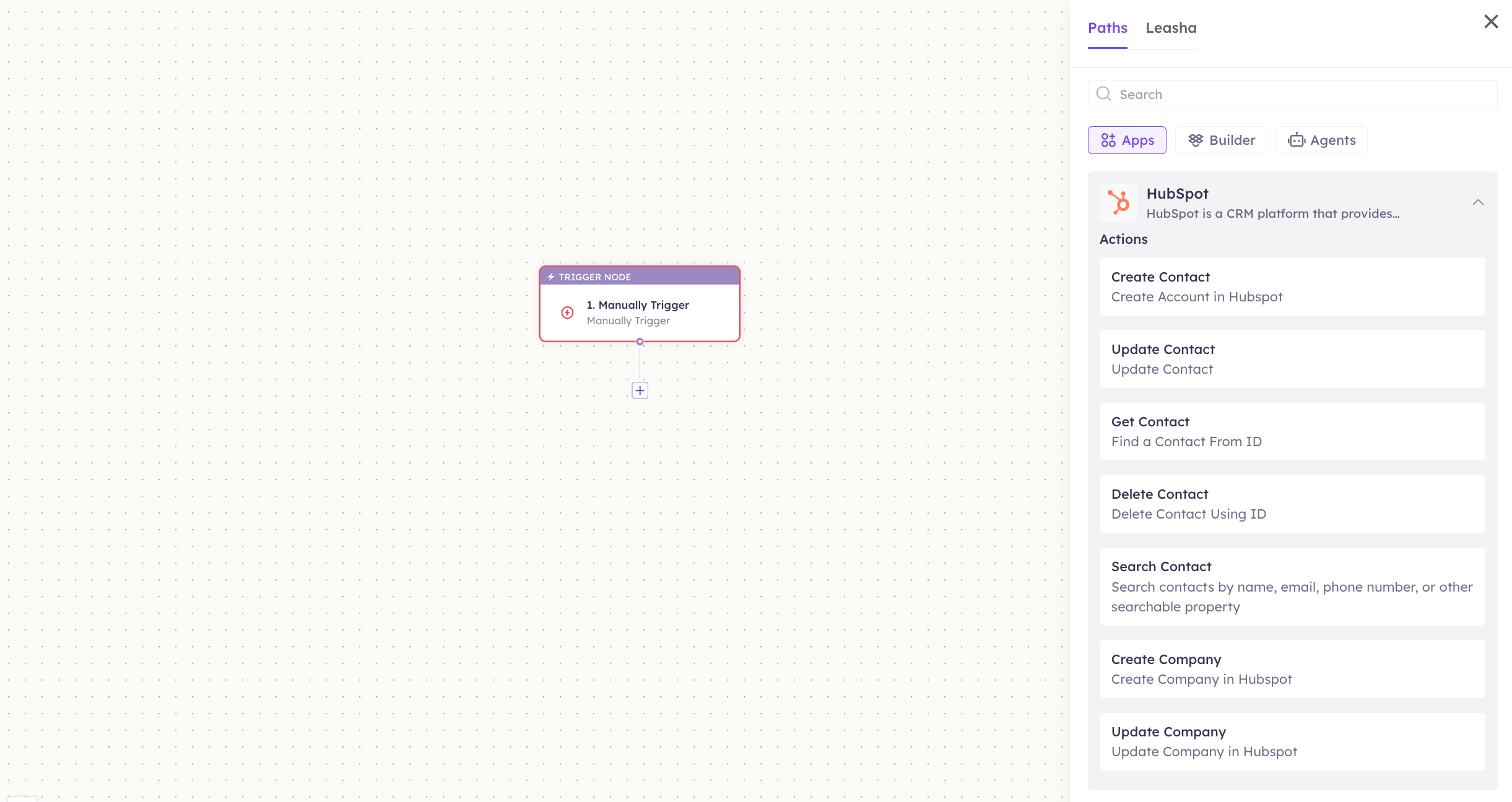
3
Configure the step
Fill in the fields for the trigger or action you picked. Required fields are marked with a red asterisk (*).
4
Add or select your account
Under Selected account, choose an already-connected account, or click Add Account to connect one now.
5
Save and test
Click Save. Use Test to verify the step, then toggle Publish when the workflow is ready.
The steps are the same for every connector. For the full workflow builder guide, see Using MCP in Workflows.
5. Available tools
6. Example usage
“Add Jane Doe, jane@acme.com, from Acme Corp as a new contact and log that we spoke today.” Runs Create Contact, then Create Engagement (a CALL or NOTE) linked to the new contact. “Find the deal for Acme Corp and show me its current stage and amount.” Runs Search Companies to find Acme, then Get Company Deals to read its open deals.7. Permissions & data access
UnleashX can:- Read, create, update and delete contacts; create and update companies and deals.
- Log engagements (calls, emails, notes, meetings, tasks) and create tickets.
- Enroll contacts in workflows and add them to lists.
- Access any HubSpot data outside the scopes you granted on the Private App.
- Change billing, account settings or other users’ permissions.
- Delete companies or deals (no delete tool is exposed for those).
8. Troubleshooting
For general connector issues, see /mcp/integrations.
9. Frequently asked questions
Is my HubSpot data stored by UnleashX? No. UnleashX calls the HubSpot API live when a tool runs and returns the result. It does not maintain a copy of your CRM (lightweight snapshots are used only to detect “new ticket/task” events). Can multiple team members connect HubSpot? Yes. Each agent stores its own token. Many teams create one shared “UnleashX” Private App and reuse its token across agents. How do I rotate my token? In HubSpot, open the Private App and click Rotate (or delete and recreate it), then reconnect in UnleashX with the new token.10. References
- HubSpot Private Apps overview: https://developers.hubspot.com/docs/api/private-apps
- Create a Private App / token page: https://app.hubspot.com/private-apps
- CRM API & scopes reference: https://developers.hubspot.com/docs/api/crm/understanding-the-crm