

Fire Crawl
In one line: Connect Fire Crawl so your UnleashX agent can crawl a whole site, scrape a single page, extract structured data, and search what it has already indexed — in plain language.
1. Overview
Fire Crawl is a web scraping and crawling platform. It handles the messy parts — rendering JavaScript, following links, stripping boilerplate — and returns clean content you can actually use. Once connected to UnleashX, your agent can kick off a crawl across a site, check that crawl’s status, scrape a single page, extract readable content or structured fields from a URL, and search previously crawled content. Crawls run asynchronously, so a large site is started once and polled for results. Connecting Fire Crawl to UnleashX means your agent can work from the live web rather than only what it was given: pull a competitor’s pricing page, harvest a docs site into a knowledge base, or check whether a page changed.2. What you’ll need
- A Fire Crawl account.
- An API key from your Fire Crawl dashboard (see Section 3).
- An UnleashX account with access to Data Connectors.
You paste an API key. UnleashX sends it to the Fire Crawl API as an authorization credential on every request.
3. Get your credentials
Fire Crawl authenticates with an API key — a single secret string you generate once in your dashboard and paste into UnleashX. There’s no OAuth flow and nothing to install.1
Sign in to Fire Crawl
Go to firecrawl.dev and sign in. If you don’t have an account yet, sign up first.
2
Open the API Keys page
In the dashboard, open API Keys. Any keys you’ve already created are listed here.
3
Create a new API key
Click Create API Key. Give it a name that tells you where it’s used — for example UnleashX. The name is only a label for you; it doesn’t affect what the key can do. A clear name matters later, when you need to know which key to revoke.
4
Copy the key immediately
Fire Crawl displays the key so you can copy it. Copy it right away and paste it somewhere safe (a password manager, or straight into the UnleashX connector).
5
Paste it into UnleashX
Head to Data Connectors → Fire Crawl in UnleashX and paste the key (full walkthrough in Section 4). UnleashX validates it immediately, so you’ll know right away if it was copied correctly.
Good to know
Permissions this key grants UnleashX
4. Connect on UnleashX
1
Open your agent
Go to https://www.tryunleashx.com and open the agent you want to connect.
2
Open Data Connectors
Inside the agent, go to Data Connectors.
3
Find Fire Crawl
Locate Fire Crawl and click Connect (or Add / Configure).
4
Paste your API key
Paste your API key and click Connect.
5
Confirm success
UnleashX validates the key and the Fire Crawl connector shows a Connected badge.
Use Fire Crawl in a Workflow
Once connected, you can add Fire Crawl to any automation from the Workflows builder. Its tools appear in the Apps panel, marked with an MCP badge.1
Add a trigger node
Open Workflows → New Workflow. On the canvas, click + Add Trigger. In the Paths panel, open the Apps tab and select Fire Crawl — its Triggers are listed underneath. Use the search box if you have many connectors.
2
Add an action node
Click the + below any node to add a step, then pick Fire Crawl again — this time the panel lists its Actions.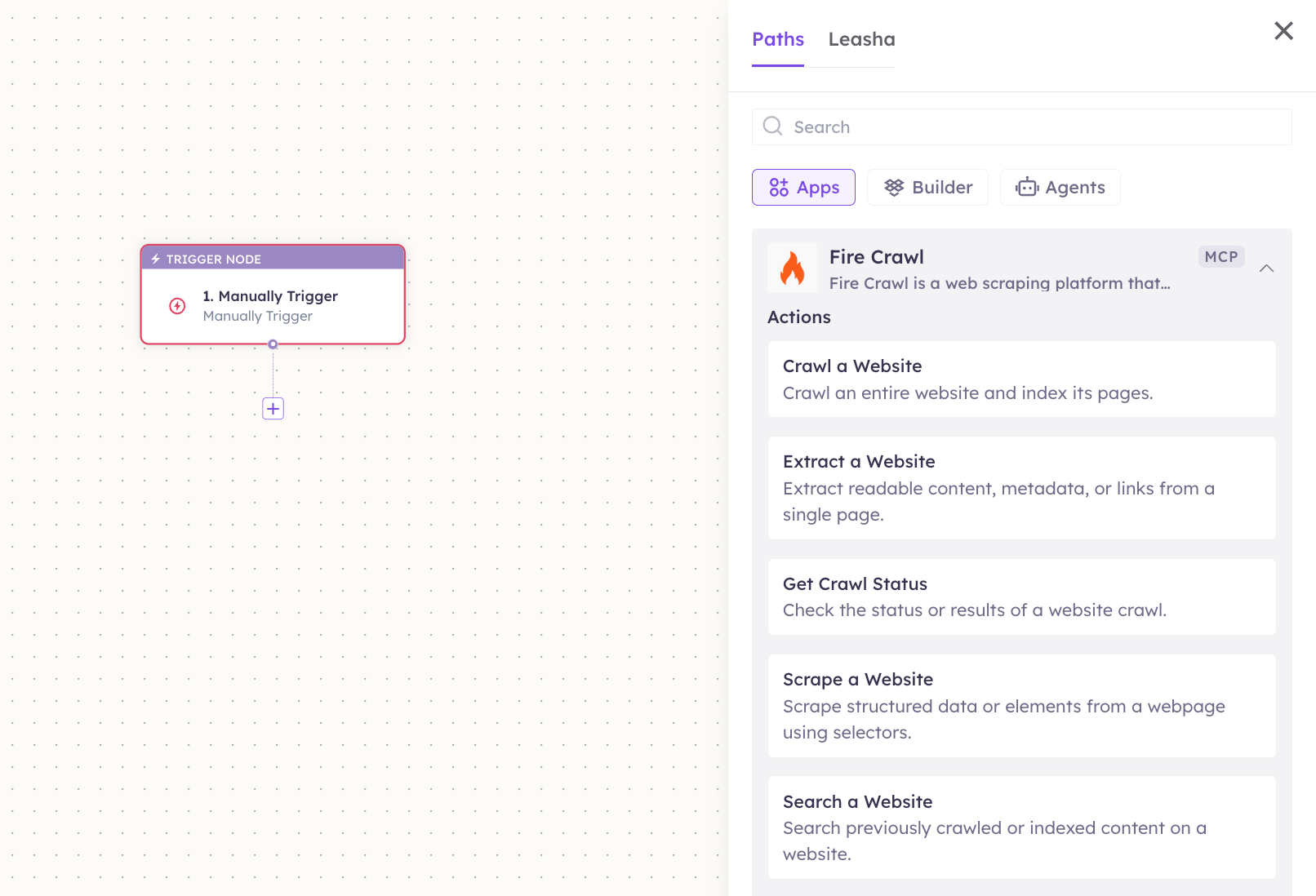
3
Configure the step
Fill in the fields for the trigger or action you picked. Required fields are marked with a red asterisk (*).
4
Add or select your account
Under Selected account, choose an already-connected account, or click Add Account to connect one now.
5
Save and test
Click Save. Use Test to verify the step, then toggle Publish when the workflow is ready.
The steps are the same for every connector. For the full workflow builder guide, see Using MCP in Workflows.
5. Available tools
6. Example usage
“Crawl docs.acme.com and tell me every page that mentions ‘rate limit’.” Runs Crawl a Website, polls Get Crawl Status, then Search a Website.
“Pull the pricing table off competitor.com/pricing.” Runs Scrape a Website with selectors for the pricing table.
7. Permissions & data access
UnleashX can:- Start crawls and check their status.
- Scrape and extract content from URLs you specify.
- Search content already crawled under your account.
- Bypass a site’s authentication, paywall, or bot protection.
- Exceed your Fire Crawl plan’s credit or rate limits.
- Change your Fire Crawl account settings or billing.
8. Troubleshooting
For general connector issues, see /mcp/integrations.