> ## Documentation Index
> Fetch the complete documentation index at: https://docs.unleashx.ai/llms.txt
> Use this file to discover all available pages before exploring further.
# Flodesk
> Let your UnleashX agent manage Flodesk subscribers, segments, custom fields and workflow enrolment.
# Flodesk
> **In one line:** Connect Flodesk so your UnleashX agent can add and update subscribers, move them between segments, enrol them into an email workflow, and react when someone new signs up.
| | |
| ------------------ | -------------------------------------------------------------------------------------------------------- |
| **Category** | CRM & Marketing |
| **Authentication** | API key |
| **Setup time** | \~3 minutes |
| **Difficulty** | Easy |
| **Best for** | Creators and small teams who run email on Flodesk and want sign-ups and segmenting handled automatically |
## 1. Overview
Flodesk is an email marketing platform. People are **subscribers**, they're grouped into **segments**, extra data lives in **custom fields**, and automated email sequences are **workflows**.
Once connected to UnleashX, your agent can list and look up subscribers, create or update them one at a time or in bulk, add and remove them from segments, unsubscribe them, manage segments and custom fields, enrol and remove them from Flodesk workflows, list campaigns, and manage webhooks.
One polling trigger fires when a new subscriber appears.
Connecting Flodesk to UnleashX closes the loop between where a lead comes from and where your email lives: a form submission, a purchase or a conversation adds the person to the right segment and starts the right sequence, without an export-import in between.
**Flodesk API keys require a paid plan.** Trial and free accounts can't create one at all, so there's nothing to connect until the account is on a paid plan.
## 2. What you'll need
* A **Flodesk account on a paid plan**.
* An **API key** from your Flodesk account settings.
* An UnleashX agent where you'll add the connector.
## 3. Get your credentials
Flodesk authenticates with an **API key**. There's no OAuth flow.
Go to [flodesk.com](https://flodesk.com/) and sign in.
Go to **My Account → Integrations → API keys**.
No API keys section? The account is on a trial or free plan. Flodesk gates API access behind a paid plan.
Create a new key and name it something you'll recognise later — for example "UnleashX".
Copy the key and store it in your password manager, then add it in **Data Connectors → Flodesk** (Section 4).
The key can read and change your whole subscriber list, including unsubscribing people. Treat it like a password and never put it in client-side code.
### Access this key grants UnleashX
| Access | Why UnleashX needs it |
| ----------------- | ----------------------------------------------------------------- |
| Read subscribers | List and look up subscribers by id or email |
| Write subscribers | Create, update, unsubscribe, and bulk upsert |
| Segments | List, read and create segments, and move subscribers between them |
| Custom fields | List and create custom field definitions |
| Workflows | List workflows and enrol or remove subscribers |
| Campaigns | List email campaigns |
| Webhooks | Register, update and delete webhooks |
## 4. Connect on UnleashX
Sign in at [https://www.tryunleashx.com](https://www.tryunleashx.com) and open the agent you want to connect.
In the agent, go to **Data Connectors** and find **Flodesk**.
Click **Connect** / **Add** / **Configure** and complete both fields:
| Field | What to enter |
| ---------------- | ------------------------------------------- |
| **Access Token** | The Flodesk API key from Section 3 |
| **Account Name** | A label for this connection inside UnleashX |
Then click **Add Tool**.
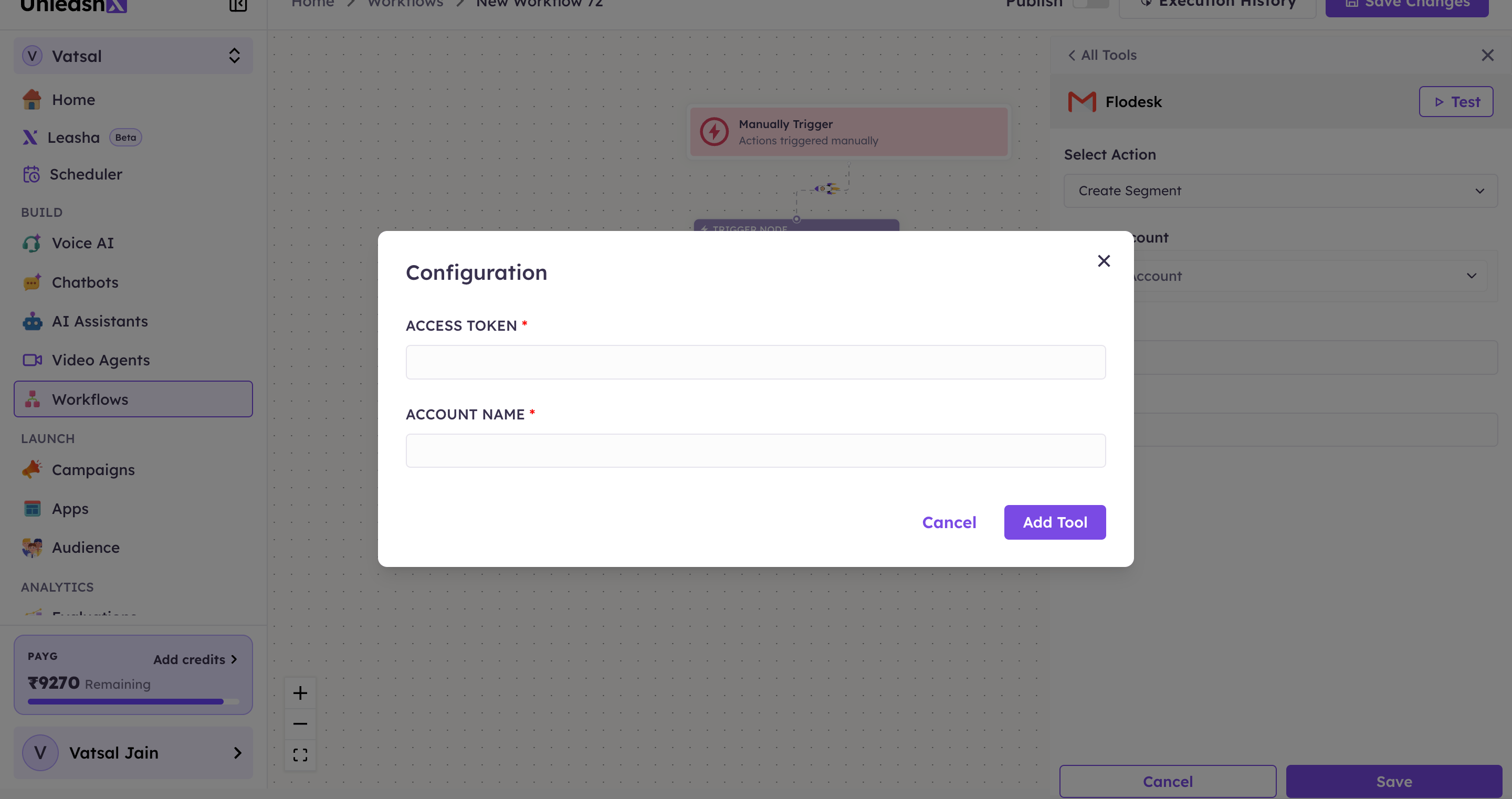 The status will switch to a **Connected** badge.
### Use Flodesk in a Workflow
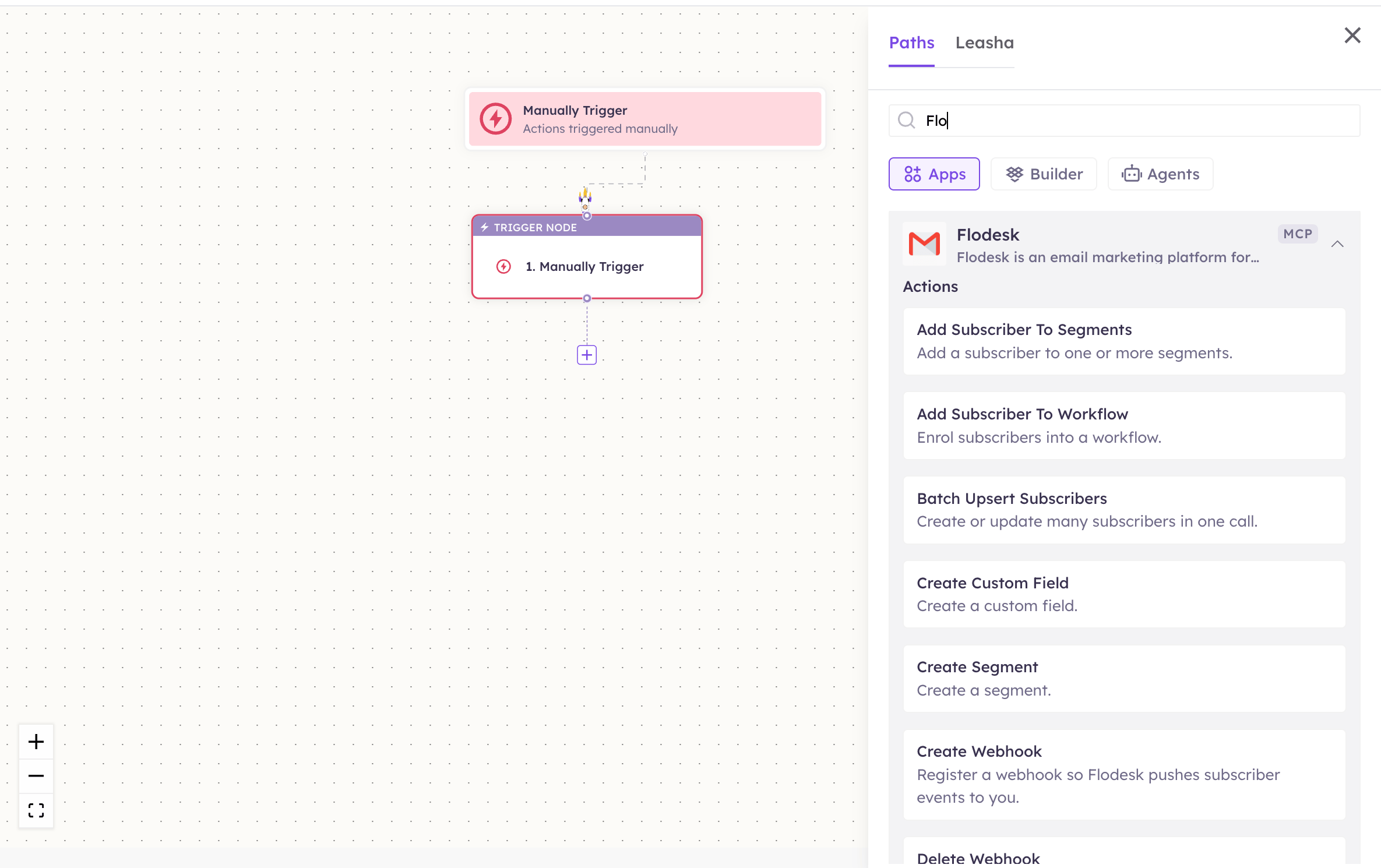
Once connected, you can add **Flodesk** to any automation from the **Workflows** builder. Its trigger and tools appear in the Apps panel, marked with an **MCP** badge.
Open **Workflows → New Workflow**. On the canvas, click the **+** below a node, then open the **Apps** tab in the **Paths** panel and select **Flodesk** — its **Actions** are listed underneath. Use the search box if you have many connectors.
The status will switch to a **Connected** badge.
### Use Flodesk in a Workflow
Once connected, you can add **Flodesk** to any automation from the **Workflows** builder. Its trigger and tools appear in the Apps panel, marked with an **MCP** badge.
Open **Workflows → New Workflow**. On the canvas, click the **+** below a node, then open the **Apps** tab in the **Paths** panel and select **Flodesk** — its **Actions** are listed underneath. Use the search box if you have many connectors.
 Choose the action from **Select Action**, then pick the connected account under **Select Account** — or click **Add Account** to connect one now.
Required fields are marked with a red asterisk (\*).
Click **Save**. Use **Test** to verify the step, then toggle **Publish** when the workflow is ready.
The steps are the same for every connector. For the full workflow builder guide, see [Using MCP in Workflows](/mcp/workflows).
## 5. Available tools
Subscribers can be addressed by **id or email interchangeably** — that's what `id_or_email` means, and either really does work.
Names match the **Workflows** Apps panel, which lists them alphabetically; they're grouped here by what they act on. The **Tool ID** is what the agent calls behind the scenes.
**Subscribers**
| Tool | Tool ID | What it does | Required | Changes data? |
| ------------------------------- | ----------------------------------------- | --------------------------------------------------------- | ---------------------------- | ------------- |
| List Subscribers | `flodesk_list_subscribers` | Lists subscribers, filterable by status and segment | — | No |
| Get Subscriber | `flodesk_get_subscriber` | One subscriber by id or email | `id_or_email` | No |
| Upsert Subscriber | `flodesk_upsert_subscriber` | Creates a subscriber, or updates them if the email exists | `email` | ✏️ Yes |
| Batch Upsert Subscribers | `flodesk_batch_upsert_subscribers` | Creates or updates many in one call | `subscribers` | ✏️ Yes |
| Add Subscriber To Segments | `flodesk_add_subscriber_to_segments` | Adds a subscriber to one or more segments | `id_or_email`, `segment_ids` | ✏️ Yes |
| Remove Subscriber From Segments | `flodesk_remove_subscriber_from_segments` | Removes them from segments | `id_or_email`, `segment_ids` | ✏️ Yes |
| Unsubscribe Subscriber | `flodesk_unsubscribe_subscriber` | Unsubscribes someone from all Flodesk email | `id_or_email` | ⚠️ Yes |
**Unsubscribe Subscriber can't be undone from here** — re-subscribing someone requires their own consent, not an API call. Make sure any workflow branch that reaches it is the one you intended.
**Segments**
| Tool | Tool ID | What it does | Required | Changes data? |
| ------------------- | ----------------------------- | ----------------------------- | ------------ | ------------- |
| List Segments | `flodesk_list_segments` | Lists segments | — | No |
| Get Segment | `flodesk_get_segment` | One segment by id | `segment_id` | No |
| Create Segment | `flodesk_create_segment` | Creates a segment | `name` | ✏️ Yes |
| List Segment Colors | `flodesk_list_segment_colors` | The colours a segment may use | — | No |
**Custom fields**
| Tool | Tool ID | What it does | Required | Changes data? |
| ---------------------- | -------------------------------- | ------------------------------------------------------ | -------------- | ------------- |
| List Custom Fields | `flodesk_list_custom_fields` | Lists custom field definitions, one page at a time | — | No |
| List All Custom Fields | `flodesk_list_all_custom_fields` | Every custom field definition in one call, unpaginated | — | No |
| Create Custom Field | `flodesk_create_custom_field` | Creates a custom field | `key`, `label` | ✏️ Yes |
**Workflows and campaigns**
| Tool | Tool ID | What it does | Required | Changes data? |
| ------------------------------- | ----------------------------------------- | --------------------------------------------- | ---------------------------- | ------------- |
| List Workflows | `flodesk_list_workflows` | Lists Flodesk workflows, filterable by status | — | No |
| Add Subscriber To Workflow | `flodesk_add_subscriber_to_workflow` | Enrols subscribers into a workflow | `workflow_id`, `emails` | ✏️ Yes |
| Remove Subscriber From Workflow | `flodesk_remove_subscriber_from_workflow` | Removes one subscriber from a workflow | `workflow_id`, `id_or_email` | ✏️ Yes |
| List Campaigns | `flodesk_list_campaigns` | Lists email campaigns | — | No |
**Webhooks**
| Tool | Tool ID | What it does | Required | Changes data? |
| -------------- | ------------------------ | --------------------------------------------------- | --------------- | ------------- |
| List Webhooks | `flodesk_list_webhooks` | Lists registered webhooks | — | No |
| Get Webhook | `flodesk_get_webhook` | One webhook by id | `webhook_id` | No |
| Create Webhook | `flodesk_create_webhook` | Registers a webhook so Flodesk pushes events to you | `url`, `events` | ✏️ Yes |
| Update Webhook | `flodesk_update_webhook` | Updates a webhook's URL, events or name | `webhook_id` | ✏️ Yes |
| Delete Webhook | `flodesk_delete_webhook` | Deletes a webhook | `webhook_id` | ⚠️ Yes |
**Triggers**
| Trigger | Trigger ID | Fires when |
| ----------------- | --------------------------- | ------------------------------------------------------ |
| On New Subscriber | `flodesk_on_new_subscriber` | A subscriber appears that the previous poll didn't see |
Flodesk's subscriber list has **no sort option**, so "newest first" can't be requested and which end of the list holds new subscribers isn't documented. The trigger reads both the first and the last page and sorts on `created_at` itself — two requests, correct either way, rather than a trigger that silently never fires.
## 6. Example usage
**"Add [jane@acme.com](mailto:jane@acme.com) to the Newsletter segment."**
Runs **Upsert Subscriber**, then **Add Subscriber To Segments**.
**"Import these 300 webinar registrants and tag them."**
Runs **Batch Upsert Subscribers** with the segment ids in one call.
**"When someone subscribes, create them in the CRM too."**
A workflow starts on **On New Subscriber** and chains into your CRM connector.
**"Start the onboarding sequence for everyone who bought yesterday."**
Runs **List Workflows** to find the id, then **Add Subscriber To Workflow** with their emails.
## 7. Permissions & data access
**UnleashX CAN:**
* Read, create, update and bulk-upsert subscribers.
* Move subscribers between segments and unsubscribe them.
* Create segments and custom fields.
* Enrol and remove subscribers from workflows, and list campaigns.
* Manage webhooks.
**UnleashX CANNOT:**
* Design or send an email campaign — it can list campaigns, not create or send them.
* Re-subscribe someone who has unsubscribed.
* Reach any Flodesk account other than the one the key belongs to.
**To disconnect:** In UnleashX, open your agent → **Data Connectors** → **Flodesk** → **Disconnect**. To fully revoke access, delete the key in **My Account → Integrations → API keys**.
## 8. Troubleshooting
| Problem | What it means | How to fix it |
| ------------------------------------------------------- | --------------------------------------- | --------------------------------------------------------------------- |
| No API keys section in Flodesk | The account is on a trial or free plan | API keys need a paid plan |
| `401 Unauthorized` | The key is wrong or was deleted | Create a new key and reconnect |
| A subscriber lookup by email returns nothing | The address differs from the stored one | Try the subscriber id, or find them with **List Subscribers** |
| Custom field values don't stick | The field key doesn't exist yet | Create it with **Create Custom Field** first; keys must match exactly |
| The trigger fires for existing subscribers on first run | The first poll has no previous snapshot | Expected — later polls only report what's genuinely new |
| A segment add silently does nothing | The segment id is wrong | Re-fetch ids with **List Segments** |
For general connector issues, see [/mcp/integrations](/mcp/integrations).
## 9. Frequently asked questions
**Is my subscriber list stored by UnleashX?**
No. Tools call the Flodesk API live with your key. UnleashX keeps only the bookkeeping the trigger needs to know what it has already seen.
**Can the agent send an email campaign?**
No. It can list campaigns and enrol people into workflows, which is what starts an automated sequence. Composing and sending campaigns stays in Flodesk.
**What's the difference between a segment and a workflow?**
A segment is a group. A workflow is an automated email sequence people are enrolled into.
**Can I connect more than one Flodesk account?**
Yes. Add each key as its own connection and tell them apart by **Account Name**.
**Does double opt-in apply?**
**Upsert Subscriber** and the batch version both accept a `double_optin` option — set it to match how you collected consent.
## 10. References
* Flodesk API documentation: [https://developers.flodesk.com/](https://developers.flodesk.com/)
* API keys (My Account → Integrations): [https://app.flodesk.com/](https://app.flodesk.com/)
Choose the action from **Select Action**, then pick the connected account under **Select Account** — or click **Add Account** to connect one now.
Required fields are marked with a red asterisk (\*).
Click **Save**. Use **Test** to verify the step, then toggle **Publish** when the workflow is ready.
The steps are the same for every connector. For the full workflow builder guide, see [Using MCP in Workflows](/mcp/workflows).
## 5. Available tools
Subscribers can be addressed by **id or email interchangeably** — that's what `id_or_email` means, and either really does work.
Names match the **Workflows** Apps panel, which lists them alphabetically; they're grouped here by what they act on. The **Tool ID** is what the agent calls behind the scenes.
**Subscribers**
| Tool | Tool ID | What it does | Required | Changes data? |
| ------------------------------- | ----------------------------------------- | --------------------------------------------------------- | ---------------------------- | ------------- |
| List Subscribers | `flodesk_list_subscribers` | Lists subscribers, filterable by status and segment | — | No |
| Get Subscriber | `flodesk_get_subscriber` | One subscriber by id or email | `id_or_email` | No |
| Upsert Subscriber | `flodesk_upsert_subscriber` | Creates a subscriber, or updates them if the email exists | `email` | ✏️ Yes |
| Batch Upsert Subscribers | `flodesk_batch_upsert_subscribers` | Creates or updates many in one call | `subscribers` | ✏️ Yes |
| Add Subscriber To Segments | `flodesk_add_subscriber_to_segments` | Adds a subscriber to one or more segments | `id_or_email`, `segment_ids` | ✏️ Yes |
| Remove Subscriber From Segments | `flodesk_remove_subscriber_from_segments` | Removes them from segments | `id_or_email`, `segment_ids` | ✏️ Yes |
| Unsubscribe Subscriber | `flodesk_unsubscribe_subscriber` | Unsubscribes someone from all Flodesk email | `id_or_email` | ⚠️ Yes |
**Unsubscribe Subscriber can't be undone from here** — re-subscribing someone requires their own consent, not an API call. Make sure any workflow branch that reaches it is the one you intended.
**Segments**
| Tool | Tool ID | What it does | Required | Changes data? |
| ------------------- | ----------------------------- | ----------------------------- | ------------ | ------------- |
| List Segments | `flodesk_list_segments` | Lists segments | — | No |
| Get Segment | `flodesk_get_segment` | One segment by id | `segment_id` | No |
| Create Segment | `flodesk_create_segment` | Creates a segment | `name` | ✏️ Yes |
| List Segment Colors | `flodesk_list_segment_colors` | The colours a segment may use | — | No |
**Custom fields**
| Tool | Tool ID | What it does | Required | Changes data? |
| ---------------------- | -------------------------------- | ------------------------------------------------------ | -------------- | ------------- |
| List Custom Fields | `flodesk_list_custom_fields` | Lists custom field definitions, one page at a time | — | No |
| List All Custom Fields | `flodesk_list_all_custom_fields` | Every custom field definition in one call, unpaginated | — | No |
| Create Custom Field | `flodesk_create_custom_field` | Creates a custom field | `key`, `label` | ✏️ Yes |
**Workflows and campaigns**
| Tool | Tool ID | What it does | Required | Changes data? |
| ------------------------------- | ----------------------------------------- | --------------------------------------------- | ---------------------------- | ------------- |
| List Workflows | `flodesk_list_workflows` | Lists Flodesk workflows, filterable by status | — | No |
| Add Subscriber To Workflow | `flodesk_add_subscriber_to_workflow` | Enrols subscribers into a workflow | `workflow_id`, `emails` | ✏️ Yes |
| Remove Subscriber From Workflow | `flodesk_remove_subscriber_from_workflow` | Removes one subscriber from a workflow | `workflow_id`, `id_or_email` | ✏️ Yes |
| List Campaigns | `flodesk_list_campaigns` | Lists email campaigns | — | No |
**Webhooks**
| Tool | Tool ID | What it does | Required | Changes data? |
| -------------- | ------------------------ | --------------------------------------------------- | --------------- | ------------- |
| List Webhooks | `flodesk_list_webhooks` | Lists registered webhooks | — | No |
| Get Webhook | `flodesk_get_webhook` | One webhook by id | `webhook_id` | No |
| Create Webhook | `flodesk_create_webhook` | Registers a webhook so Flodesk pushes events to you | `url`, `events` | ✏️ Yes |
| Update Webhook | `flodesk_update_webhook` | Updates a webhook's URL, events or name | `webhook_id` | ✏️ Yes |
| Delete Webhook | `flodesk_delete_webhook` | Deletes a webhook | `webhook_id` | ⚠️ Yes |
**Triggers**
| Trigger | Trigger ID | Fires when |
| ----------------- | --------------------------- | ------------------------------------------------------ |
| On New Subscriber | `flodesk_on_new_subscriber` | A subscriber appears that the previous poll didn't see |
Flodesk's subscriber list has **no sort option**, so "newest first" can't be requested and which end of the list holds new subscribers isn't documented. The trigger reads both the first and the last page and sorts on `created_at` itself — two requests, correct either way, rather than a trigger that silently never fires.
## 6. Example usage
**"Add [jane@acme.com](mailto:jane@acme.com) to the Newsletter segment."**
Runs **Upsert Subscriber**, then **Add Subscriber To Segments**.
**"Import these 300 webinar registrants and tag them."**
Runs **Batch Upsert Subscribers** with the segment ids in one call.
**"When someone subscribes, create them in the CRM too."**
A workflow starts on **On New Subscriber** and chains into your CRM connector.
**"Start the onboarding sequence for everyone who bought yesterday."**
Runs **List Workflows** to find the id, then **Add Subscriber To Workflow** with their emails.
## 7. Permissions & data access
**UnleashX CAN:**
* Read, create, update and bulk-upsert subscribers.
* Move subscribers between segments and unsubscribe them.
* Create segments and custom fields.
* Enrol and remove subscribers from workflows, and list campaigns.
* Manage webhooks.
**UnleashX CANNOT:**
* Design or send an email campaign — it can list campaigns, not create or send them.
* Re-subscribe someone who has unsubscribed.
* Reach any Flodesk account other than the one the key belongs to.
**To disconnect:** In UnleashX, open your agent → **Data Connectors** → **Flodesk** → **Disconnect**. To fully revoke access, delete the key in **My Account → Integrations → API keys**.
## 8. Troubleshooting
| Problem | What it means | How to fix it |
| ------------------------------------------------------- | --------------------------------------- | --------------------------------------------------------------------- |
| No API keys section in Flodesk | The account is on a trial or free plan | API keys need a paid plan |
| `401 Unauthorized` | The key is wrong or was deleted | Create a new key and reconnect |
| A subscriber lookup by email returns nothing | The address differs from the stored one | Try the subscriber id, or find them with **List Subscribers** |
| Custom field values don't stick | The field key doesn't exist yet | Create it with **Create Custom Field** first; keys must match exactly |
| The trigger fires for existing subscribers on first run | The first poll has no previous snapshot | Expected — later polls only report what's genuinely new |
| A segment add silently does nothing | The segment id is wrong | Re-fetch ids with **List Segments** |
For general connector issues, see [/mcp/integrations](/mcp/integrations).
## 9. Frequently asked questions
**Is my subscriber list stored by UnleashX?**
No. Tools call the Flodesk API live with your key. UnleashX keeps only the bookkeeping the trigger needs to know what it has already seen.
**Can the agent send an email campaign?**
No. It can list campaigns and enrol people into workflows, which is what starts an automated sequence. Composing and sending campaigns stays in Flodesk.
**What's the difference between a segment and a workflow?**
A segment is a group. A workflow is an automated email sequence people are enrolled into.
**Can I connect more than one Flodesk account?**
Yes. Add each key as its own connection and tell them apart by **Account Name**.
**Does double opt-in apply?**
**Upsert Subscriber** and the batch version both accept a `double_optin` option — set it to match how you collected consent.
## 10. References
* Flodesk API documentation: [https://developers.flodesk.com/](https://developers.flodesk.com/)
* API keys (My Account → Integrations): [https://app.flodesk.com/](https://app.flodesk.com/)